.png)

.jpg)
ZMO.ai Review for Fashion Ecommerce: Features, Pricing, Limits
ZMO.ai is an AI image generation platform used by fashion and ecommerce brands to produce on-model imagery, background replacements, and product visuals without a studio shoot. This review covers its core features, pricing tiers, real limitations at catalog scale, and where a fully managed production service becomes the more practical choice.
This is not a beginner's guide to AI imagery. It is a production-oriented assessment for teams managing real SKU volumes.
What is ZMO.ai and what does it do for fashion ecommerce?
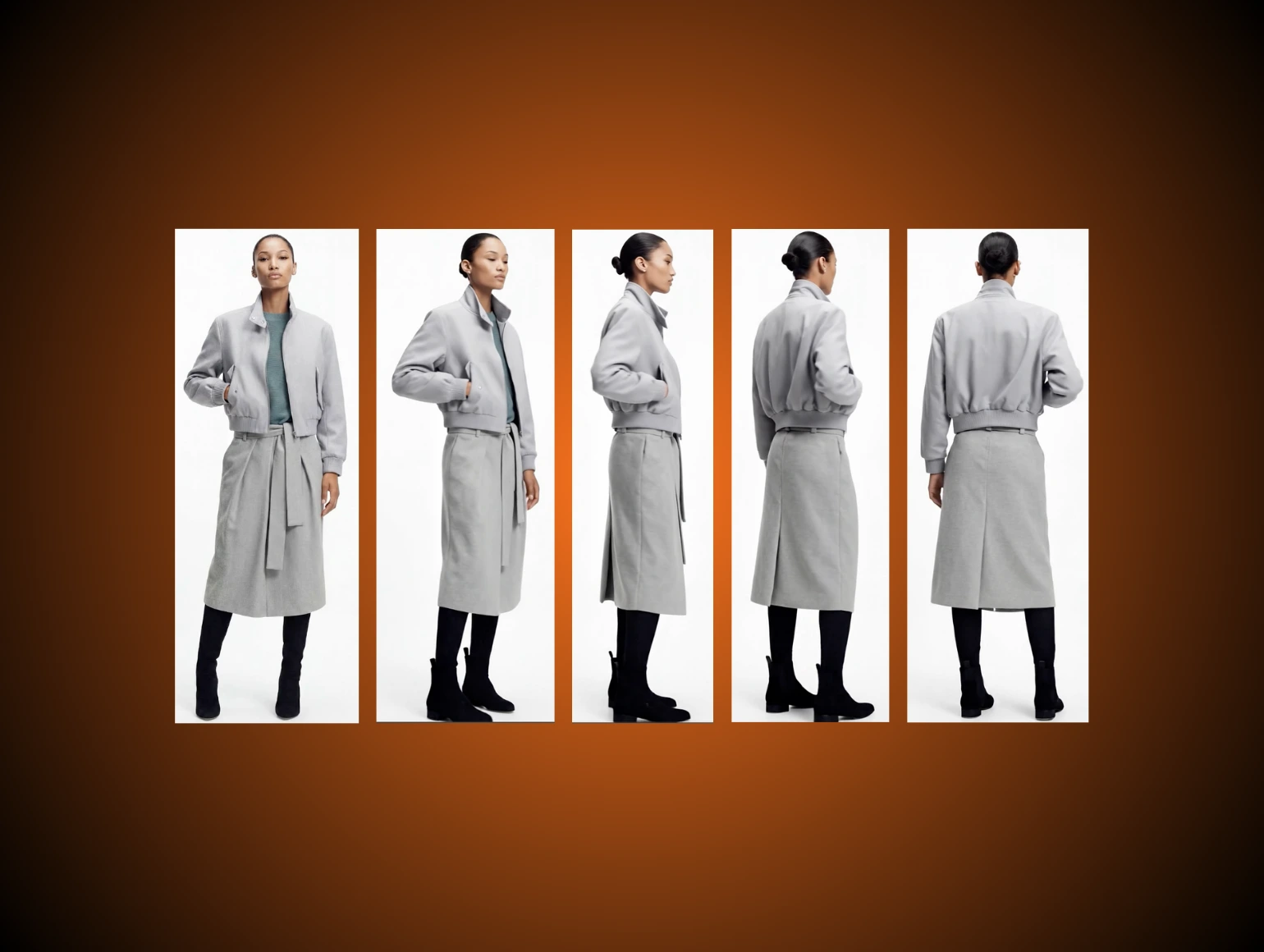
ZMO.ai is a web-based AI creative platform built around three core capabilities: AI model generation (placing apparel on generated human figures), background removal and replacement, and AI image editing. For fashion ecommerce, the model generation feature is the primary use case. Brands upload flat-lay or mannequin product shots; the platform renders them onto AI-generated models in configurable poses, skin tones, and body types.
The platform runs on ZMO's proprietary AIGC Image Engine, which handles segmentation, edge refinement, and background inpainting. It is browser-only, requires no integration to get started, and processes individual images in under five minutes on standard plans.
ZMO.ai core features: what actually matters for product teams
AI model generation. The flagship feature. Upload a flat-lay or ghost mannequin shot and ZMO renders it onto a human model. You control body type, skin tone, pose orientation, and scene background. Results are usable for catalog imagery in most cases, with caveats around complex fabric behavior covered below.
Background removal and replacement. One-click removal with generative inpainting fills the resulting gaps cleanly. Users can drop products into preset scenes or upload custom backgrounds. Free downloads are limited to 720px; full resolution requires a paid plan.
AI image editing. Object removal, watermark removal, lighting adjustments, and basic retouching. Useful for quick fixes but not a substitute for structured post-production on high-volume catalogs.
Batch processing. Available on higher-tier plans and via API for enterprise accounts. Critical for any team running more than a few dozen SKUs.
ZMO.ai pricing: what each tier actually gives you
ZMO.ai offers a free tier with 10 starting credits and access to three models using the base AIGC engine. Paid plans are structured as follows: Basic at $59 per month includes 30 credits and access to 10 models with rollover credits; Pro at $199 per month includes 100 credits, 30 models, the advanced engine, and rollover; Enterprise at $799 per month includes 400 credits, 80 models, customizable model profiles, carryover credits, and priority support.
The credit-based model means high-volume teams hit ceilings fast. At 100 credits per month on Pro, a brand with 500 active SKUs needing two model variants each would exhaust a monthly budget in a single collection drop. Enterprise pricing at $799 per month is fixed-volume, not truly unlimited, and does not include SLA guarantees or a dedicated account team.
For brands processing under 100 images per month, the Pro tier is workable. For brands running seasonal catalog production at scale, the credit structure is a meaningful operational constraint.
What ZMO.ai does well
Speed on simple garments. Tops, dresses, and outerwear on solid or minimal backgrounds generate quickly with acceptable results. For brands that need basic on-model catalog imagery for straightforward products, ZMO delivers a usable first pass at significant cost savings over traditional shoots.
Model diversity. The platform supports over 50 different body types and skin tones, enabling brands to create inclusive imagery that resonates with diverse customer bases without coordinating complex photoshoots. For brands building representation across customer demographics, this is a genuine capability advantage.
Accessible entry point. No integration, no technical setup, no minimum commitment. Teams can test it on real product photos within an hour. The free tier is functional enough to evaluate fit before committing to a paid plan.
Background replacement quality. For simple product isolation and scene compositing, the inpainting engine handles most cases cleanly, including hair-edge and sleeve refinement that previously required manual masking.
Where ZMO.ai breaks down at catalog scale
Complex fabric and texture rendering. Highly textured fabrics, metallic materials, or garments with complex patterns may occasionally require manual editing for optimal results. At catalog scale, "occasionally" compounds into a significant QA workload. Silk with structural drape, heavily embroidered pieces, and items with small text or logo placement regularly require correction before they are brand-safe.
Anatomy and fit consistency. Users report that AI outputs sometimes add extra body parts, leave people with anatomically incorrect features, or transform original spaces beyond recognition. For hero imagery and brand-critical placements, these errors require human review on every image.
Brand consistency across batches. ZMO does not lock a model profile to your brand. Two sessions generating the same garment can produce visibly different model faces, lighting directions, or pose interpretations. For brands building a consistent visual identity across a catalog of thousands of images, this is a structural limitation, not a settings problem.
No SLA, no account management, no creative direction. ZMO is a self-serve tool. There is no creative director reviewing your outputs for brand alignment, no SLA governing turnaround on batch jobs, and no escalation path when outputs fall short of requirements. For an in-house team running low volumes, this is fine. For a brand with seasonal launch deadlines and agency-level brand standards, the absence of managed production is the operational gap that matters most.
Output ownership and compliance. Legal and ethical considerations around AI-generated imagery continue evolving. Brands should ensure their use of AI models complies with advertising regulations in their target markets and clearly communicates any use of AI-generated imagery where required by local consumer protection laws. ZMO's outputs are licensed for commercial use, but the platform provides no guidance on marketplace-specific compliance (Amazon, Zalando, and others each have distinct requirements on AI-generated imagery disclosure).
How ZMO.ai fits into a hybrid production workflow
Many teams use ZMO.ai for a specific slice of their production stack rather than as an end-to-end solution. Common hybrid patterns:
ZMO for variation testing, managed production for hero imagery. Generate 10 to 15 model variants in ZMO to identify which body type and pose combination performs best in A/B tests. Run confirmed winners through a managed production pipeline for quality-controlled hero image output.
ZMO for speed-to-market on new SKUs, retouching for finalization. Get a product into market quickly with a ZMO-generated image while the polished version is in production. The gap in quality is acceptable on day-one listings; the final asset replaces it within the production window.
ZMO for background replacement, professional post-production for model work. ZMO's background removal and replacement is strong enough for many catalog use cases. Separate the model generation workload, which requires more QA, from the background and scene work, which ZMO handles cleanly.
For brands already running this kind of hybrid workflow, Pixofix's AI PDP service integrates directly into existing asset pipelines, handling the catalog-scale model imagery with brand-locked consistency while ZMO handles lower-stakes variation work in-house.
Who should use ZMO.ai
Good fit:
- DTC brands with under 200 SKUs per season and simple garment types
- In-house teams that have capacity to review and correct AI outputs
- Brands A/B testing model diversity before committing to full catalog production
- Teams that need background replacement and basic image editing at low volume
Not a good fit:
- Brands running seasonal drops of 500 to 10,000+ images with hard launch deadlines
- Fashion labels with complex fabrics, detailed prints, or logo-critical garments
- Teams without internal retouching capacity to QC every AI output
- Brands that require consistent model identity across an entire catalog
How ZMO.ai Compares to Other AI Fashion Model Tools
ZMO.ai is not the only tool in this space, and for many fashion ecommerce teams, it is not the best fit. The four tools below cover the main alternatives with meaningfully different positioning. Each is evaluated on the same criteria that matter for catalog production: model consistency, garment fidelity, batch capability, and fit for fashion-specific workflows.
Botika
Botika is purpose-built for fashion ecommerce. Unlike ZMO, which is a general AI image platform with a fashion module, Botika's entire product is focused on converting garment photos into on-model imagery. The workflow is tighter, the model library is fashion-trained, and the Shopify integration is native rather than bolted on.
Botika AI is built as a specialized AI fashion model generator for ecommerce brands that want to create studio-style product images with virtual models from existing garment photos. Its workflow is straightforward: upload flat-lay shots, ghost mannequin imagery, or basic product photos, then Botika's AI generates images where realistic models wear the garment.
Botika supports batch processing for large catalogs and offers consistent model identity so the same AI model can appear across multiple products. This is a direct capability gap relative to ZMO, which does not lock model identity across sessions.
Limitations. Botika has no pose changer and no custom model maker, and its NSFW filter is known to be over-sensitive, often rejecting legitimate lingerie or swimwear products. For brands with complex garment categories, this is a practical constraint. Because the tool is not simulating actual physics, challenging garments may produce inconsistent folds, slightly off tension lines, or repeating texture artifacts.
Pricing. Botika's Starter plan is priced at $15 per month for 15 photo credits and access to 5 models. The Pro plan is $50 per month, and the Studio plan is $225 per month.
Best fit: Fashion-first Shopify brands that need model identity consistency across a catalog, with moderate monthly volumes and simpler garment types.
Claid.ai
Claid.ai takes a different approach. It is an API-first product photography suite that covers AI model generation as one capability within a broader workflow that includes background removal, image upscaling to 4K, relighting, and image-to-video. Claid is best overall for fashion photography. It's a full product-focused suite (on-model shots, AI backgrounds, retouching, video) built for ecommerce workflows and marketplaces, with strong quality and control.
The key differentiator is pipeline integration. Claid's API gives access to 20+ image and video operations. You can chain multiple operations as workflows in a single API call. For teams running automated production pipelines, this is a significant operational advantage over ZMO or Botika, which are primarily web-platform tools.
Claid uses a credit-based system. Operations cost 1 to 10+ credits depending on complexity. Self-serve API plans start at $59 for 1,000 credits. For higher volumes, custom enterprise plans are available with volume pricing, dedicated support, and SLAs.
Limitations. Claid is incredibly powerful, but built for developers and enterprise operations. For an independent fashion brand, the learning curve is steep and the pricing is aggressive. Teams without technical resources to build and maintain API integrations will not get value from Claid's core strengths.
Best fit: Development-led teams or marketplace operators that need AI model generation integrated into an existing automated image pipeline, with the technical resources to use the API.
Fashn.ai
Fashn.ai is the most technically specialized tool in this comparison. Where ZMO, Botika, and Claid all work from garment photos to generate a new model wearing the item, Fashn.ai's core capability is virtual try-on: taking an existing model photo and re-dressing it with your garment. FASHN.ai develops in-house AI models specifically for fashion. Their core strength is virtual try-on technology: taking a model photo and re-dressing it with your garments. They also offer AI model creation for brands that need consistent digital models across collections.
This distinction matters for how it fits into a production stack. Fashn.ai is not a replacement for a model generation tool; it is a complement. The most common use case is applying multiple colorways or variant garments onto an existing approved hero model image, rather than generating a new model for every SKU from scratch.
With plans starting at $19 per month and API access at $0.075 per generation via fal.ai, FASHN.ai is particularly attractive for developers building try-on experiences.
Limitations. The virtual try-on approach requires a quality hero model photo as input, which means it is not a starting-from-scratch solution. Output quality is heavily dependent on input photo quality, lighting, and pose.
Best fit: Brands that already have a set of hero model photos and want to apply catalog-scale variant imagery without reshooting. Also suitable for teams building consumer-facing virtual try-on features on product pages.
The honest summary: None of these tools solve the problems that matter at catalog scale: brand-locked model consistency across thousands of SKUs, human QA on complex garments, contractual turnaround, and creative direction. They all share the same structural ceiling. The question is not which tool has the best features; it is at what volume and quality threshold a self-serve tool stops being cost-effective compared to a managed service.
ZMO.ai vs. a managed AI production service: how to decide
ZMO.ai and a managed production service solve different operational problems. The decision comes down to volume, brand standards, and whether your team has the internal capacity to run QA and creative direction themselves.
The honest framing: ZMO.ai is a capable tool for in-house teams with low to moderate volumes and simple product types. When catalog velocity increases, garment complexity rises, or brand consistency becomes non-negotiable, a self-serve tool introduces QA overhead that a managed service eliminates.
For fashion brands producing catalog imagery at scale, Pixofix's AI Models Agency operates on a fully managed model: brand-locked model profiles, human creative direction, and 24 to 48 hour turnaround on batch production, with no credit ceiling.




.png)
.png)
