.png)


AI Product Photography: What Actually Works for Ecommerce (Honest Review)
AI Product Photography: What Actually Works for Ecommerce
A premium apparel team recently found its post-production bill rising faster than its shoot budget. Their merchandisers started comparing AI product images with traditional assets in live tests. The outcome was blunt: faster delivery, but more scrutiny on details. That tradeoff defines modern catalog production.
AI Product Photography for Ecommerce
Where It Helps Most
AI product photography is strongest when the product already has a clear, stable form. Flat lays, simple cutouts, and repeatable colorways are ideal because the system can preserve the item while changing the scene around it. The best use is not replacing photography entirely, but reducing repetitive studio work and post-production bottlenecks. For ecommerce teams, that means shorter launch cycles and less dependency on manual retouch for every variant.
Where It Saves Time
Speed gains usually appear in background removal, scene generation, and variant creation. A clean source image can move through the pipeline much faster than a full retouch session. That matters when merchandising needs new assets for seasonal drops, marketplace updates, or localized campaigns. To keep that speed, lock file naming, color profiles, and export presets before production starts.
Why Hybrid Wins
The most reliable workflow is hybrid. Shoot the real product first, then use AI for background swaps, lifestyle settings, and repeatable layout changes. This keeps the original garment, object, or package intact while cutting repetitive editing work. Teams that try to let AI handle every step usually end up rebuilding assets later.
AI Product Photography Workflow
Start With Clean Inputs
Source quality determines output quality. Use high-resolution files, consistent lighting, and neutral capture conditions so the AI has fewer variables to invent. Raw or lightly compressed files are better than heavily edited images because they preserve edge detail and texture mapping. If the input is messy, the output will need more human correction.
Choose The Right Task
Different tasks need different setups. Background replacement, ghost mannequin assembly, on-model composites, and generative video all behave differently in production. Do not run them through the same prompt set or batch rules. Separate workflows by asset type so QC teams can verify each output against a specific standard.
Lock Style Rules
Style locks reduce drift across batches. Define shadow direction, crop ratio, backdrop tone, and model pose before the first image is processed. LoRA training can help anchor visual patterns, but only if the reference library is clean and consistent. If the rules are loose, the catalog will start to look like several brands mixed together.
Build QC Loops
QC loops should happen at two levels. First, run automated checks for clipping paths, edge bleed, color variance, and resolution. Then add human review for shoulder structure, hand shape, jewelry reflections, and logo placement. This is where e-commerce photo editing service style review stacks are useful, because they catch issues before they hit live pages.
Export For Each Channel
Marketplace exports are not the same as DTC exports. Amazon, Shopify, and regional retail platforms often require different dimensions, background rules, and file formats. Create presets for each destination and test them before a batch goes live. That reduces rework and keeps marketplace product image adherence under control.
AI Product Photography Metrics
Cost Per Usable Asset
Track the full cost per image, not just the tool fee. Include retouch time, review time, rejected assets, and export handling. This metric shows whether AI is actually reducing production costs or simply moving them into another step. A strong team knows the real number before scaling a workflow.
Days From Shoot To Live
Measure the number of days from capture to publication. This is one of the cleanest signs that your pipeline is working. If the interval keeps shrinking while quality holds steady, the system is improving. If it drops but error rates rise, the workflow is too aggressive.
First Pass Acceptance
First pass acceptance shows how many files clear review without edits. It is a better signal than raw volume because it captures both accuracy and speed. Low acceptance usually points to weak source photography, poor prompts, or too much post-production bottleneck pressure. Raise the number by tightening capture standards and review rules.
Revision Rate
Revision rate tracks how often a file needs fixes before approval. Watch this by category, because jewelry, beauty, and apparel behave differently. If revisions cluster around the same defect, such as hand distortion or reflective surfaces, adjust prompts or stop using AI for that SKU type. The goal is fewer corrections, not just faster creation.
Conversion And Return Signals
Image performance should connect to business outcomes. Compare click-through rate, add-to-cart behavior, and return rate by asset set. If a new image style drives engagement but also raises returns, the visuals may be overselling the product. Use controlled tests so you can isolate the effect of the image rather than guess.
AI Product Photography Mistakes
Skipping Human Review
The biggest mistake is sending AI output live without inspection. Even strong models can distort hands, flatten jewelry, or change shoulder structure in ways that are easy to miss at scale. Human QC should always sit between generation and publication. That final pass is not optional for customer-facing assets.
Using AI On Every SKU
Not every product should be processed the same way. Reflective goods, delicate textiles, and logo-heavy items often need traditional photography and manual retouch. AI works better as a support layer than as a universal replacement. Match the workflow to the material, not the budget pressure.
Ignoring Color Accuracy
Colorways are one of the hardest areas to control. Small shifts in lighting, prompt interpretation, or upscaling can create visible drift between reference and final output. Always compare against physical swatches or calibrated source files. If the color is wrong, the asset is wrong.
Letting Drift Spread
A batch can start clean and become inconsistent halfway through. That usually happens when style rules are not enforced after the first few files. Keep versioned references, lock prompts, and review sample sets during the run, not after it ends. This prevents one weak batch from contaminating the catalog.
Overusing Generic Generators
General-purpose tools can look impressive in isolation. The problem is that they often fail when used at catalog scale. They may introduce fake textures, unstable geometry, or unusable text rendering. For ecommerce, prioritize tools built for product assets rather than mood-board output.
AI Product Photography By Category
Apparel And Fashion
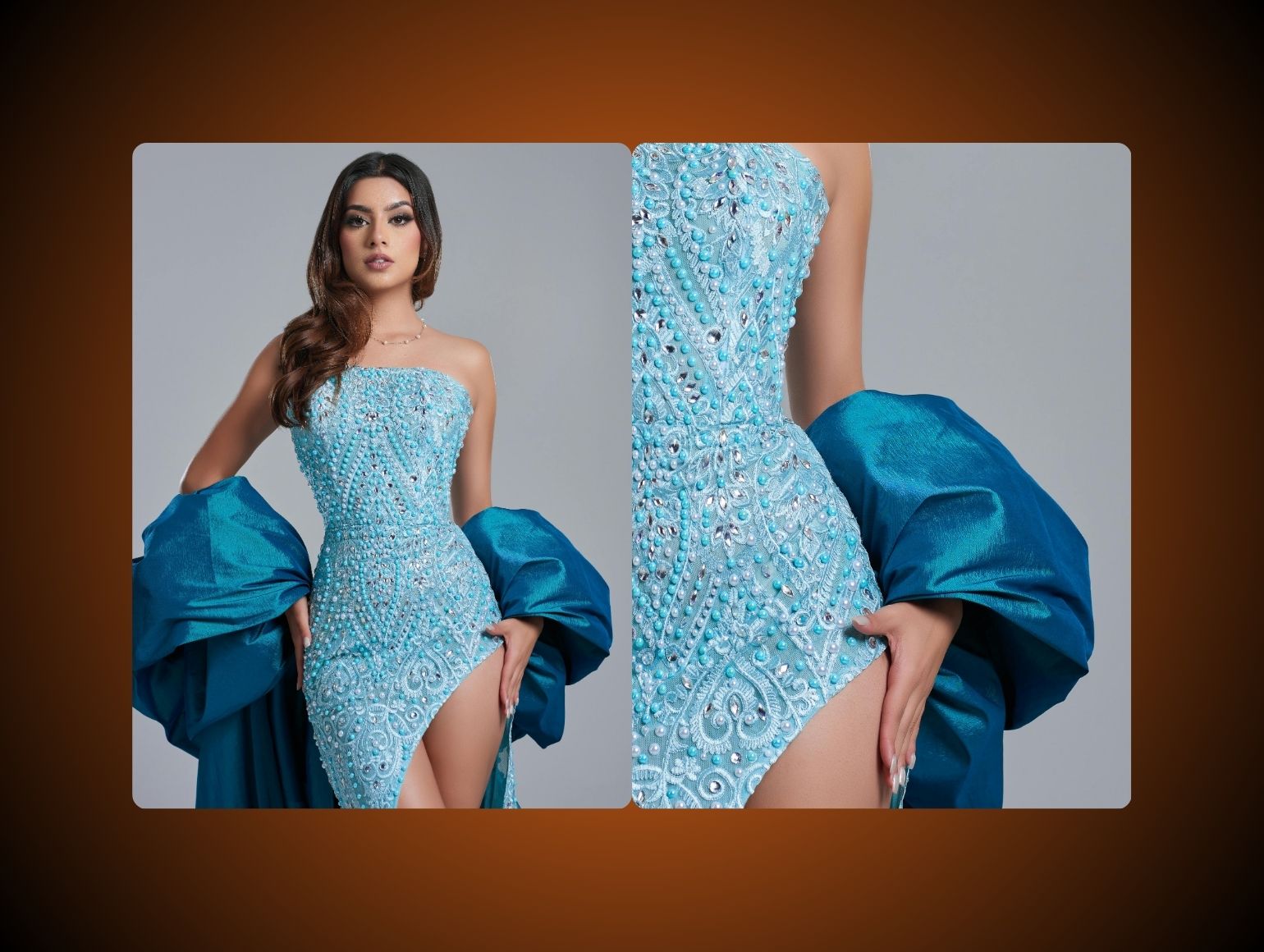
Apparel is the most practical category for hybrid production. Ghost mannequin workflows, clean flat lays, and colorway expansion all benefit from AI assistance. Still, fabric fold accuracy matters, and AI often struggles with lace, satin, knits, and complex drape. Use manual correction for any garment where fit or material feel drives conversion.
Beauty And Skincare
Beauty assets need careful handling because consumers inspect finishes closely. Bottles, tubes, and jars work well with background replacement, but skin-adjacent imagery needs restraint. AI can introduce plastic sheen or unrealistic reflections around applicators. Keep the product real and use AI only for controlled scene support.
Home Goods
Furniture, bedding, and decor benefit from scene generation because the context matters. AI can place products in rooms, show scale, and support multiple colorways without reshooting entire sets. However, shadows and surface interaction must be checked against the original item. Glass, chrome, and polished wood still need manual cleanup.
Electronics
Electronics need precision more than creativity. Labels, screen content, and port placement must stay accurate, which is where many AI systems fail. If the product includes a display, composite the real UI later. That keeps the asset believable and avoids random glyphs on the screen.
Marketplaces And DTC
Marketplace images demand stricter compliance and cleaner edges. DTC assets can be more expressive, but they still need consistency across campaigns. The best approach is to separate compliance assets from creative assets and give each its own QA path. That prevents a lifestyle experiment from breaking a listing rule.
AI Product Photography Tools
Dedicated Platforms
Purpose-built ecommerce platforms are usually the safest starting point. They are designed for batch upload, repeatable output, and marketplace presets. That reduces post-production bottlenecks and lowers the chance of manual formatting errors. Pixofix and similar systems are strongest when they sit inside the review chain rather than outside it.
Fashion Generators
Fashion-specific generators are useful for on-figure output and variant testing. They can maintain a stronger link between garment shape, pose, and colorways than generic systems. Still, they need accurate reference material and clear approval rules. Without that, the model may drift in fit, shoulder structure, or pose symmetry.
Suite Add-Ons
Photoshop and similar suites remain important because they solve the last mile. AI can generate or clean up a file, but a human still needs to handle difficult edges, fine text, and compositing corrections. Add-ons are most useful when they fit into existing retouch workflows. That keeps teams from rebuilding their process around a tool that is only good at one task.
General Generators
Open image generators are best for concepting, not final assets. They are useful when marketing wants quick visual directions or creative mockups. They are less reliable for clipping paths, color fidelity, and product geometry. Use them for ideation, then move final work into a stricter system. If you are comparing options, Midjourney and Stable Diffusion are useful reference points.
AI Product Photography Limitations
Fabric Detail Problems
AI often misses weave structure, sheen changes, and subtle fabric tension. This is especially obvious in lace, velvet, satin, and tailored wool. When a buyer is choosing by touch expectation, those errors matter. Use AI for context, not as a substitute for the product surface itself.
Jewelry And Glass Issues
Reflective surfaces remain difficult. Rings, sunglasses, perfume bottles, and metallic accents often show broken reflections or melted edges. These failures are not minor, because they change how premium the product feels. Keep genuine photography for any item where shine is part of the selling point. Related guidance is covered in high end photo retouching and image color correction.
Hand And Pose Errors
Hands are still a weak spot in many generative systems. Fingers can merge, bend oddly, or attach at the wrong angle. Pose structure also slips, especially in on-model apparel shots. Review every image that includes skin contact or complex body positioning.
Logo And Label Drift
Text is another frequent failure point. Logos can warp, labels can duplicate, and care tags can lose legibility. That creates compliance and brand risks that are hard to catch in a fast review cycle. Use masks, inpainting, or manual finishing when brand marks are visible.
Texture And Surface Artifacts
Some outputs look polished at first glance but fail on closer inspection. Watch for weird grain, smeared stitching, broken shadows, and unrealistic specular highlights. These issues often appear after upscaling or aggressive enhancement. A strong QC loop should flag them before export.
What To Avoid
Rushing Batch Production
Do not push large batches without sample review. Early files reveal prompt weakness, lighting mismatch, and model drift before the whole run is affected. One small stop-and-check step can save hours of cleanup later. That is especially true for launch-week work.
Mixing Asset Goals
Do not use the same workflow for every image type. A hero banner, a marketplace main image, and a social variant each need different rules. Mixing them blurs approval criteria and creates unnecessary rework. Keep each asset class in its own lane.
Ignoring Platform Rules
Marketplace rejection is often a formatting problem, not a creative one. Incorrect background tones, crop ratios, or resolution can stop a listing before it reaches customers. Validate exports against the channel spec before upload. That simple step protects your calendar.
Overediting The Product
Do not let enhancement change the actual item. If AI improves the silhouette too much, the customer receives a visual promise the product cannot meet. That mismatch can hurt trust and raise returns. Keep changes around the product, not inside it.
AI Product Photography Checklist
Clean Capture Standards
Use consistent lighting, stable framing, and uncluttered source files. Keep the original product central and avoid unnecessary visual noise. This gives the model fewer chances to invent details.
Controlled Prompting
Keep prompts short, repeatable, and tied to the asset type. Long creative prompts create more variability and harder-to-audit results. Maintain a prompt library by category and update it only after review.
Structured Review Stages
Set an automated pass, then a human pass, then a final export pass. Each stage should look for different problems. That separation makes the QC process easier to measure and easier to improve.
Channel-Specific Export Rules
Build separate export profiles for each destination. File size, resolution, background color, and metadata should match the platform before upload. This avoids avoidable rejections and lowers support overhead. For DTC teams, product page practices can help keep those assets aligned with on-page conversion goals.
Change Control
Track prompt versions, style guides, and approval notes in one place. When an image fails, you need to know exactly what changed. Without change control, the same defect will repeat in later batches.




.png)
.png)
